TABLE OF CONTENTS
Parent Interaction
This section describes the functionality available to parents and shows what they are presented with. This is available to all parents and guardians that have an active SEQTA Engage account. For details on SEQTA Engage, please see the following Knowledge Base articles:
Understanding how SEQTA Engage accounts work
Overview of the SEQTA Engage provisioning and guardian access process
SEQTA Engage manual
In the Navigation bar of SEQTA Engage, the Absences sub-page is the location for submitting absence notifications. Parents have the following functionality available to them: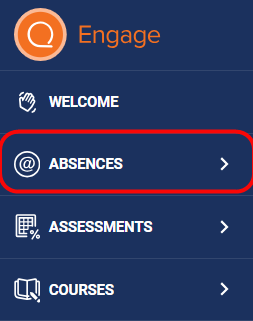
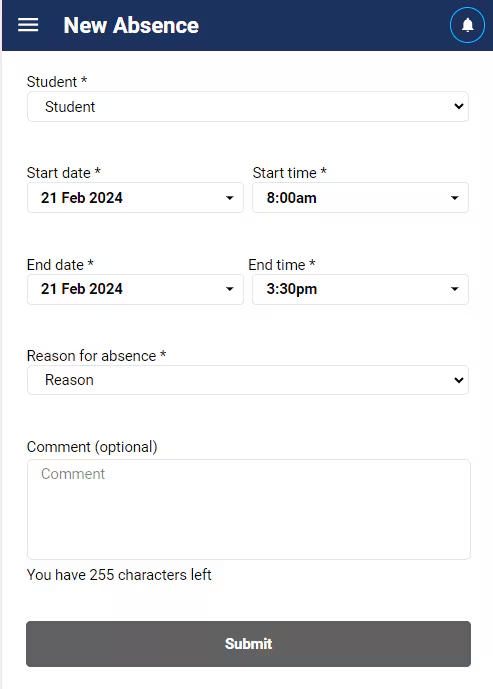
Within New Absence:
The ability to submit a new notification of an absence from their mobile device without having to contact the school in any other way.
The ability to submit a notification of absence for Today, or any date into the future. Submissions for dates in the past are not possible.
However, lodging a notification of an absence starting before the present moment but on Today’s date is possible. For example, submitting an absence for the day, at 8:45am when the school day started at 8:00am, is possible.
- NOTE that editing of the time display will show times available from midnight, not from the start of the school day.
A request can only be submitted for one child at a time. If parents/guardians have multiple children at the same SEQTA school, they will need to submit a new request for each child’s absence. We are planning to look into the selection of multiple children at the same SEQTA school as a potential future iteration. Unfortunately linking of SEQTA Engage accounts across different schools will not be available.
Part days and multiple days can be selected.
Recurring absences cannot be submitted with this feature. We will be assessing the needs of schools and end users in the future to determine if this functionality poses a significant need.
Parents must choose a Reason for the absence from the list provided. Schools are in control of this list and this is covered in the Configuration section of Parent Notified Requested Absences.
Parents have a free text Comment box in which additional information can be portrayed to the school.
All fields are mandatory except for the comments, unless expressly set as mandatory by the school.
The Absence section will not be available to parents/guardians if no Attendance Types have been made Available to Parents? by the school administrators.
Related articles:
Was this article helpful?
That’s Great!
Thank you for your feedback
Sorry! We couldn't be helpful
Thank you for your feedback
Feedback sent
We appreciate your effort and will try to fix the article