TABLE OF CONTENTS
- Parent Notified Requested Absences
- Permissions Required
- Configuration
- To setup this functionality, the following two steps should be followed:
Parent Notified Requested Absences
The Parent Notified Absences feature allows parents using the SEQTA Engage App to log absence notifications direct with the school on their mobile device, through the SEQTA Engage App, or through the parent web portal.
These absence notifications allow parents to inform the school when their child will not be attending school either that day or in the future. This could be to inform the school of a student’s absence, such as a child’s sickness or the family’s decision to start their vacation a few days earlier than the end of term.
Attendance administrators are able to quickly and easily process these notifications in SEQTA, to gain an overview of their students' attendance, inform teachers and staff, and focus on any unexplained absences.
Parent Notified Absences is available to all schools utilising SEQTA Engage with no additional cost to their SEQTA subscription.
Permissions Required
- Attendance Administrators must have the ATT Adm:Edit permission, to allow them to manage all attendance using the Attendance Administration Page, including processing Attendance, managing tutorials etc.
- Attendance Administrators are recommended to have the ATT:SOLNS permission, to allow them to add or change Attendance solutions in the SIP or to edit the details of existing attendance.
- To make changes to the Attendance Types, the permission DATA:EDIT and the dependent ATT:EDIT permission
Configuration
Parent Notified Absences uses a school’s existing Attendance Types, to ensure consistent processing and reporting of absence in alignment with the schools existing attendance policies and processes. Schools are also able to control when this feature is opened to parents and guardians to use through the Application Settings > SEQTA Engage > Parent Notified Absences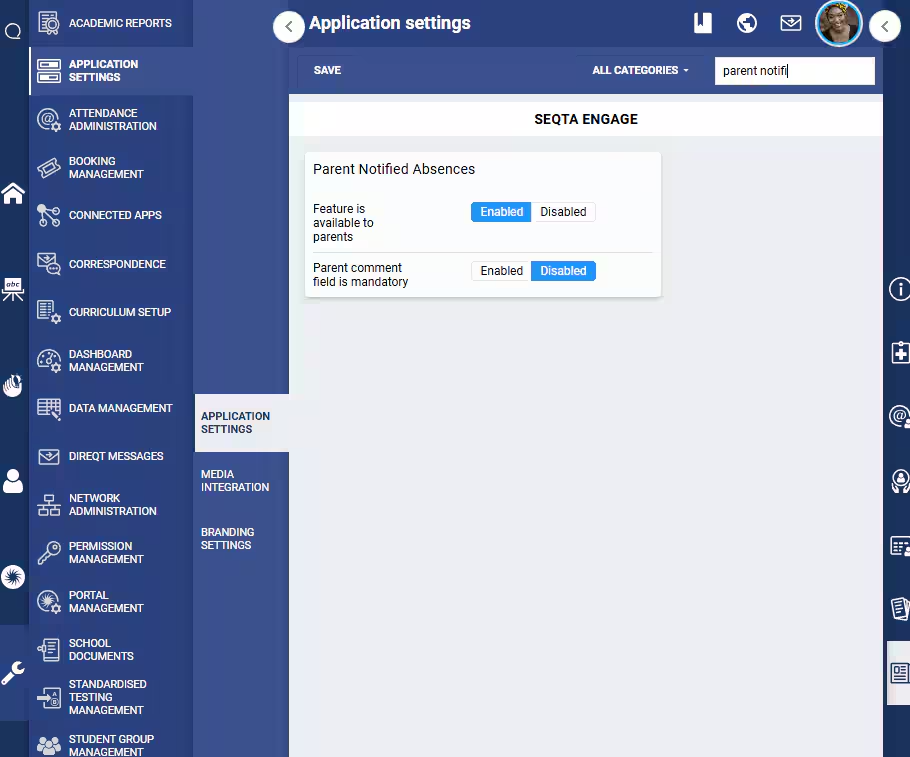
To setup this functionality, the following two steps should be followed:
Step 1
Schools are in control of what absence reasons (attendance types) are available for parents and guardians to choose. This is done by editing the corresponding Attendance Type in SEQTA: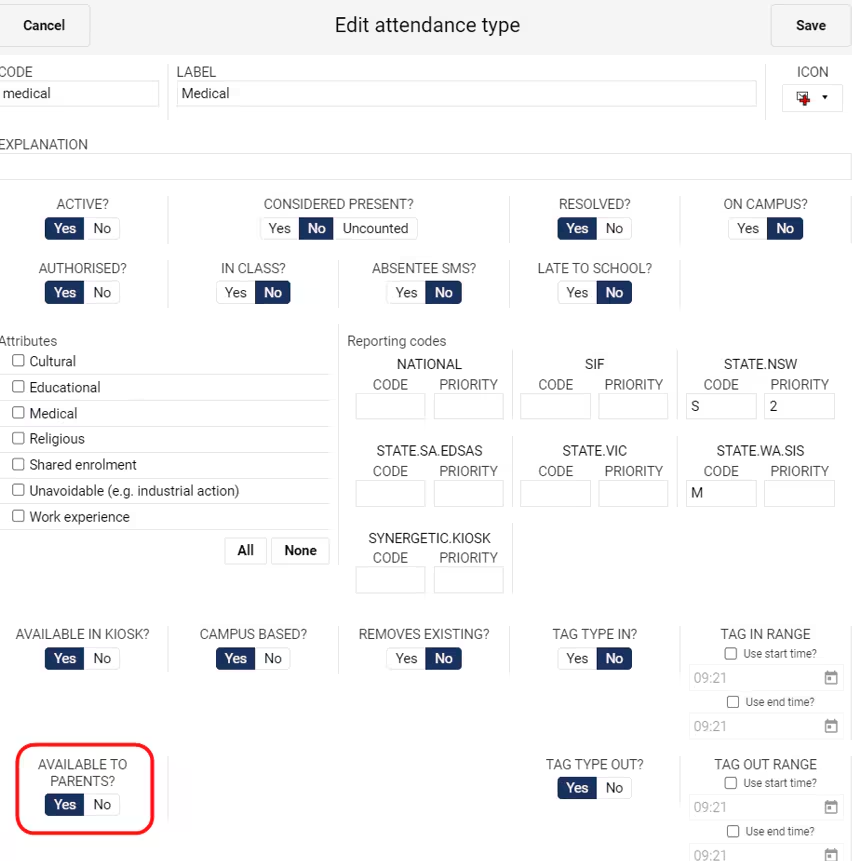
For the best usability and adoption by parents, we suggest the following:
Limit the number of options available to parents to between 4 and 6 options. We suggest the following categories:
Sickness/Injury
Medical appointment
Holiday
Bereavement
Other
An optional comment text box is always available to parents. This can be made mandatory through Application Settings > SEQTA Engage > Parent Notified Absences
Creating an “Other” Attendance Type allows parents/guardians more flexibility if the student’s absence is not covered by the listed options, saving them the need to contact the school through other means
The Attendance Types chosen should have the option “Considered Present?” set to No
The Attendance Types must have the option “Available to Parents?” set to Yes
Only once one or more Attendance Types have been marked “Available to Parents?” will the Absence section become available in SEQTA Engage for parents/guardians to interact with
It is worth noting that although there is a threshold that limits the number of days into the past or future that absences can be entered (in the Attendance section in Application Settings), this threshold applies to the functionality available to Teachers and other staff entering absences, e.g. in the Attendance Roll. This setting does not affect the ability of Attendance Administrators to enter absences, nor parents to notify of an absence outside of this threshold. That is to say, although the school may limit teachers to only be able to enter absences 2 days in the past or future, parents are still able to notify the school of a planned absence in a month’s time, and Attendance Administrators are able to process this without restriction.
Step 2
Enable the feature in Application Settings
- Note: Only once one or more Attendance Types have been marked "Available to Parents?" will the Absence section become available in SEQTA Engage for parent/guardians to interact with
This double-check allows schools to configure their system before exposing the functionality to parents/guardians, but also does not confuse parents/guardian with exposing features not yet fully setup.
For Further details on Parent Interaction click here
For Further details on Requested Absences - Attendance Administration click here
Was this article helpful?
That’s Great!
Thank you for your feedback
Sorry! We couldn't be helpful
Thank you for your feedback
Feedback sent
We appreciate your effort and will try to fix the article