TABLE OF CONTENTS
There are various options for creating notes in SEQTA. The best option will depend on the purpose of the note and who requires access to view the note.
Class notes
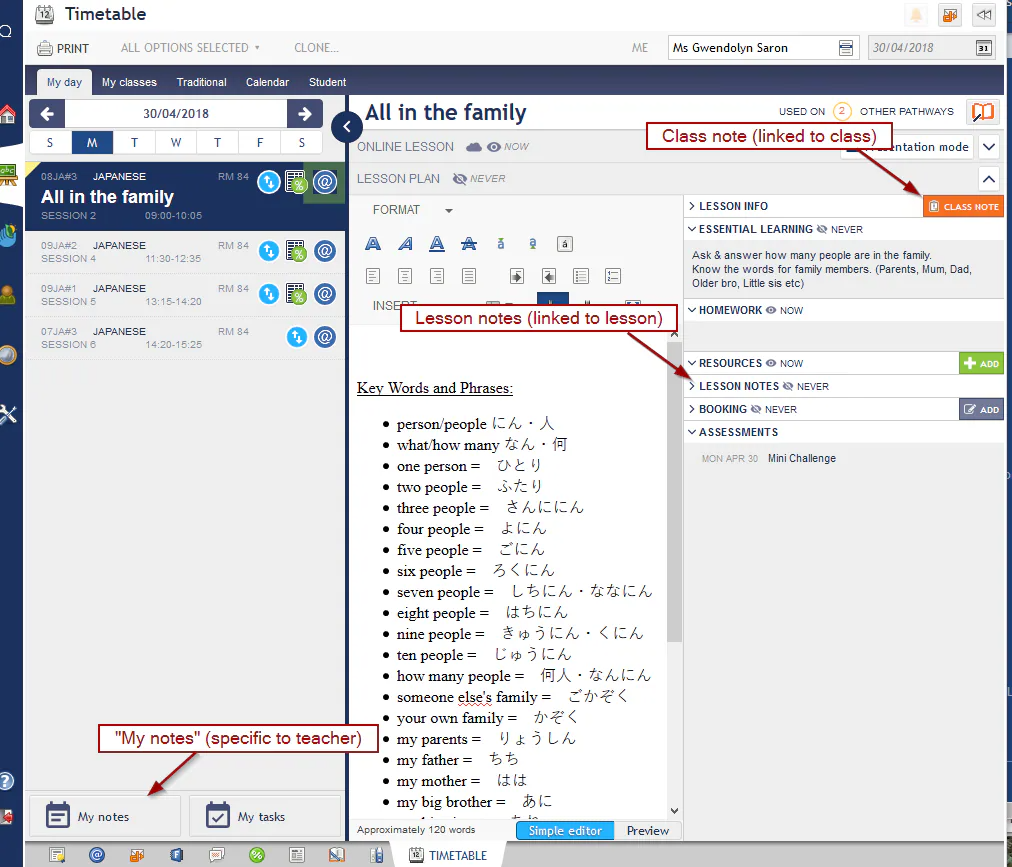
'Class notes' are used to store information relating to a class. Information entered into class notes will display under every instance of the class for that teacher.
- Never visible to students or parents
- Visible to staff, the class note will not show for other classes sharing the programme (ie. a note entered for 7ENG#1 will not show in the class 7ENG#2). However, other staff can view it by accessing the programme through the class with the note attached (in this example 7ENG#1).
My notes
'My notes' are used to store general notes, not related to a specific class. Information entered under My notes can also be accessed via the Notes dashlet on the staff member's Dashboard page.
- Never visible to students or parents
- Never visible to staff
Lesson notes
'Lesson notes' are used to enter information relating to a specific lesson. Lesson notes display for all classes in the programme share, unless Pathways has been setup, using the clone option to 'copy all lessons' or 'create new lessons'.
- Never visible to students or parents
- Visible to all staff who are sharing the lesson
Was this article helpful?
That’s Great!
Thank you for your feedback
Sorry! We couldn't be helpful
Thank you for your feedback
Feedback sent
We appreciate your effort and will try to fix the article