TABLE OF CONTENTS
Using the unused lesson browser to access lessons
- Go to the Teaching workspace>Timetable>My classes/Traditional view/Calendar classes.
- Click on the Load programme icon for the class you would like to import the lessons into.
- Select Lesson organiser
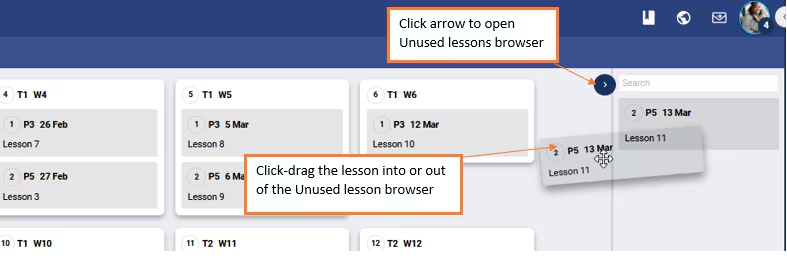
- Open the Unused lessons browser by clicking on the tabbed arrow "<" in the top-right corner.
- Find the required lessons, then click-drag it onto the applicable week in the main work area.
Was this article helpful?
That’s Great!
Thank you for your feedback
Sorry! We couldn't be helpful
Thank you for your feedback
Feedback sent
We appreciate your effort and will try to fix the article