The 'Lesson organiser' is used to reorder lessons (individually or a week at a time), import lessons from other programmes, access Unused lessons (including lessons from other Pathways) and remove lessons.
If needing to change the lesson order in a shared programme, without affecting other classes, Create an additional Pathway using the option 'use existing lessons', then assign it to the current class.
- Go to Teaching workspace > Timetable > My classes
- Load programme icon > Lesson organiser
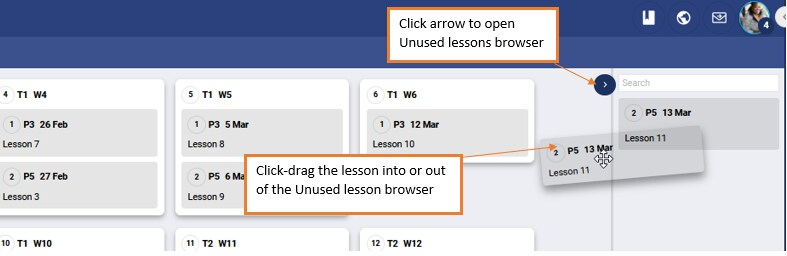
- If required, open the Unused lessons browser by clicking on the black arrow in the top-right corner (the unused lessons browser can be used to access lessons created on other pathways, or lessons that have been removed from the current pathway).
- The following actions are available:
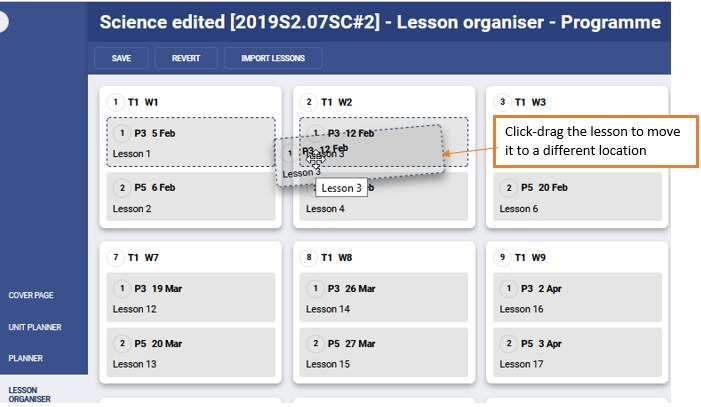
- Click-drag individual lessons to change order within a week, or move the lesson onto a different week
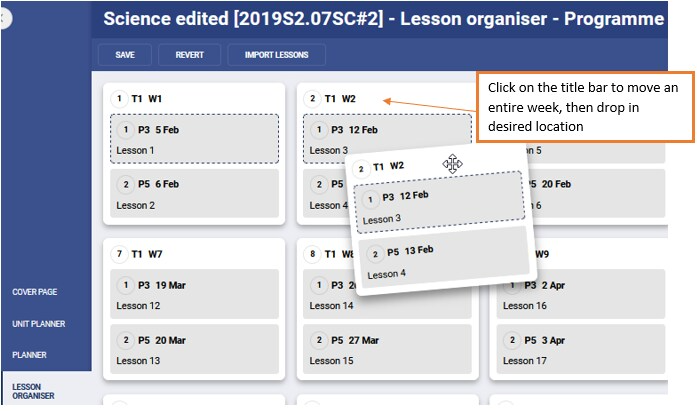
- Click and drag a week of lessons to a different date
- Click and drag individual lessons into or out of the Unused lessons browser
- Click-drag individual lessons to change order within a week, or move the lesson onto a different week
- Click Save to keep changes.
Lesson order out of sync
If the lesson order is out of sync with other classes in the programme, this indicates that one of the below conditions are being met.
- One of the classes has a lesson that falls on a public holiday or other non-teaching day, and the other does not
- One of the classes starts later in the semester than the other
- One of the classes is on a different Pathway - changes to lesson order only apply to the pathway
Regardless of the cause, issues with lesson order being out of sync can be resolved by assigning the classes to different 'Pathways'. This will allow the lesson order to be corrected for one class without affecting the others.
Please ensure all weeks and lessons, for the entire reporting period are added before setting up pathways. In addition, when creating the pathway ensure the option 'Use existing lessons' is selected.
Related articles:
Was this article helpful?
That’s Great!
Thank you for your feedback
Sorry! We couldn't be helpful
Thank you for your feedback
Feedback sent
We appreciate your effort and will try to fix the article