If a Programme is shared with other classes, and Pathways have been setup, then the process for sharing a lesson is as follows.
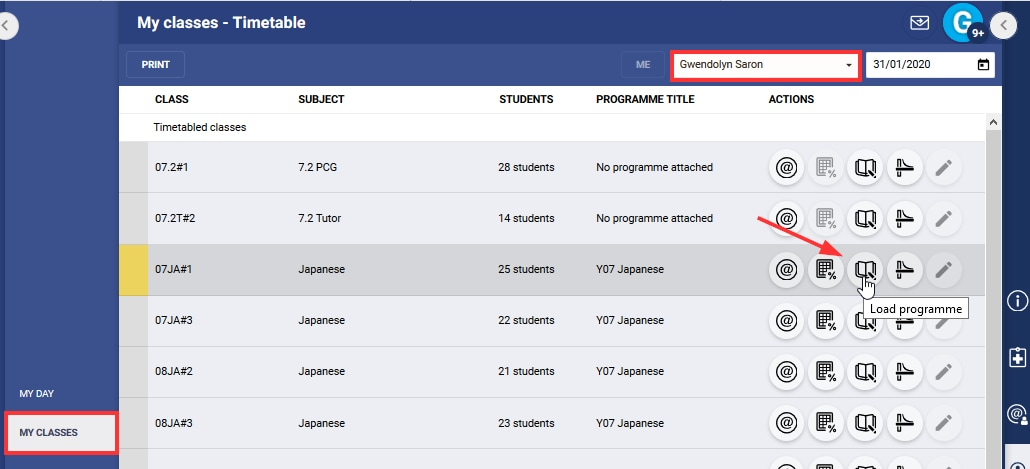
- Go to the Administration Workspace > Timetable > My Classes.
- If working on behalf of another teacher, select their name in the top-right corner.
- Find the class that needs the shared Programme added and click on the Load Programme icon.
- Open the Lesson Organiser sub-page.
- Open unused lessons by clicking on the arrow in the top-right corner.
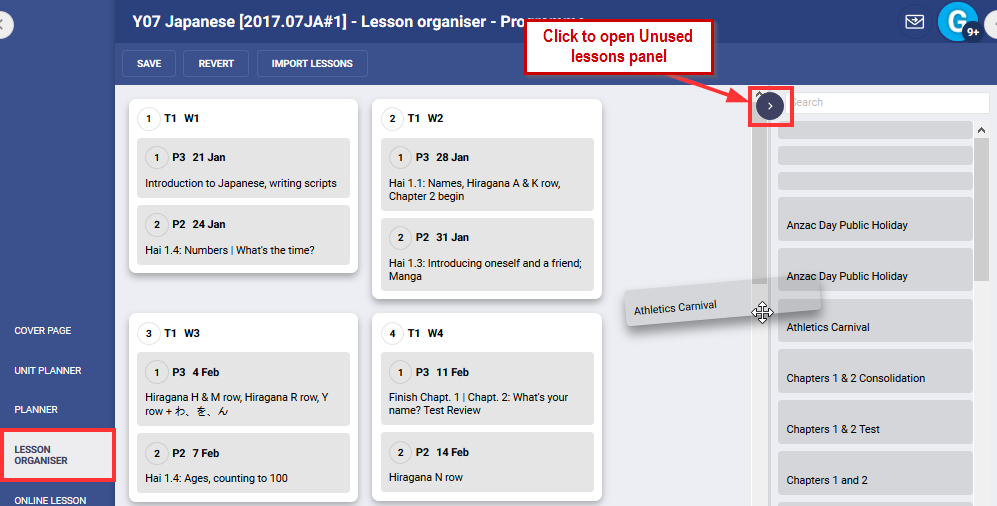
- Find the lesson you would like to add.
- Click and drag them onto the appropriate week and drag the blank lessons into Unused Lessons.
- Click SAVE.
Was this article helpful?
That’s Great!
Thank you for your feedback
Sorry! We couldn't be helpful
Thank you for your feedback
Feedback sent
We appreciate your effort and will try to fix the article