How to delete a lesson
Go to Teaching workspace>Timetable>My classes/Traditional view/Calendar
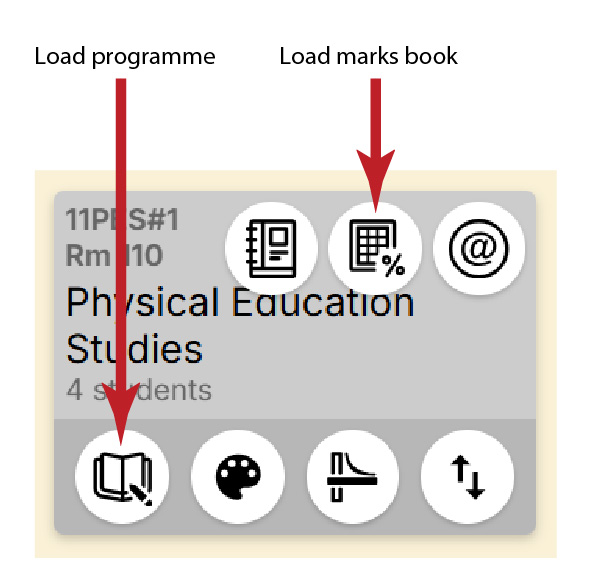
- Click on the Load programme icon for the class
- If the icon is not visible, choose Load marks book, then choose Programme in the navigation sidebar
- Select Planner
- Find the relevant lesson then click the Bin icon to delete the lesson
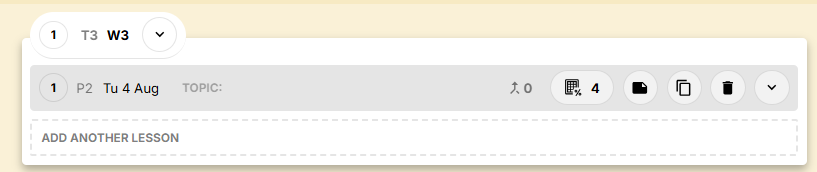
Lessons listed in the Unused lesson browser under Lesson organiser should be dragged onto an empty week so that they can be deleted. You can add an empty week by choosing the Add week button in the Planner.
Deleting lessons when using Pathways
When multiple Pathways exist, scheduled lessons will only have the option to be moved to the Unused lesson browser. (The Bin icon is replaced with a Minus icon, with a rollover that states Remove this lesson from schedule). When you click on the Minus icon, a notification will advise you that the lesson is now floating.
Permanent deletion can be expected if the lesson originated on the pathway that it is being deleted from and is not on any other pathway’s schedule at the time. Should there have been pathways which have previously been deleted it may not be possible to delete the lessons entirely.
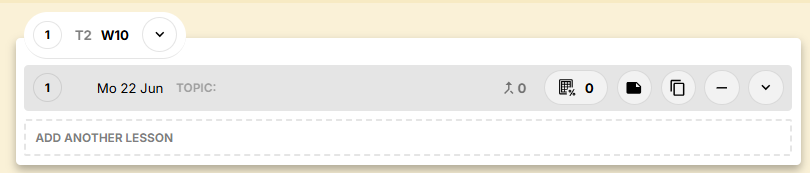

To permanently delete a lesson when using Pathways:
- In the Planner, click on the Minus icon for the relevant lesson
- Use the Add week option to create an unscheduled week at the end of the lesson planner schedule
- In the Lesson organiser, move the lesson into this unscheduled week
- The option to delete the lesson (the Bin icon) will be visible.
- Click on the Bin icon to delete the lesson
Was this article helpful?
That’s Great!
Thank you for your feedback
Sorry! We couldn't be helpful
Thank you for your feedback
Feedback sent
We appreciate your effort and will try to fix the article