TABLE OF CONTENTS
- Unsharing/unattaching programmes from classes
- How to un-attach a programme
- Preventing results and Marks books from disappearing
Unsharing/unattaching programmes from classes
There are numerous scenarios that may require a Programme to be unattached from a class. A common reason is when there are two programmes shared with one class This is indicated by the class showing twice on the timetable.
Also note that programmes are not deleted - they are simply unattached from their class. They can still be found in the List of programmes and reattached.
IMPORTANT INFORMATION
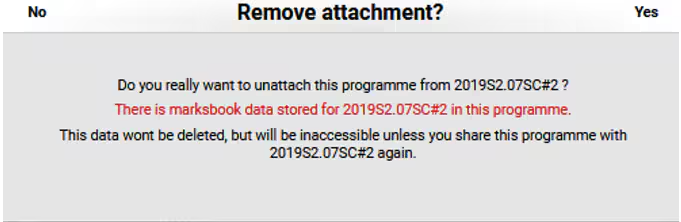
If the message below appears, click No, and do further checking to confirm why the programme with student marks would need to be unattached from the class.
For further assistance, please contact the SEQTA Support team via the Help portal, with the details of the programme, class and teacher.
How to un-attach a programme
- Go to Teaching workspace>Timetable>My classes or Traditional view
- If working on behalf of another teacher, select their name in the top-right corner.
- Check the marks book first, to ensure there aren't any results in there.
- Click the Load programme icon for the class with the unwanted programme attached.
- On the Cover page, locate the Tags box and type in the 'class code' (eg. 7MAT#1) and the teachers surname. This will make it easier to find the programme should it need to be re-shared with the class.
- Click the Collaboration settings button.
- At the bottom of the editing pane, find the section labelled This programme is attached to the following classes: Next to the class name/code, click the Bin icon.
- If the Remove attachment dialog box appears (as in the screenshot above), please click 'No' and contact the SEQTA Support team for assistance. If there is no red text warning you are safe to proceed. Click Yes.
- Confirm the action with OK.
Preventing results and Marks books from disappearing
Before starting this process, please check the marks book for assessment or reporting data. The marks book is part of the programme which means if the programme is unattached the marks book will no longer be available on the class. Should this occur, sharing the unattached programme back to the class will restore the marks book and results. See Finding unattached programmes and marks books
To ensure teachers are aware that unattaching a programme will make the results inaccessible, the system will display a message in red text warning of this. If the Yes button is clicked, the programme will be unattached.
Was this article helpful?
That’s Great!
Thank you for your feedback
Sorry! We couldn't be helpful
Thank you for your feedback
Feedback sent
We appreciate your effort and will try to fix the article