TABLE OF CONTENTS
The steps for changing the default from and to dates for the Student Summary pages in the Pastoral care workspace are as follows:
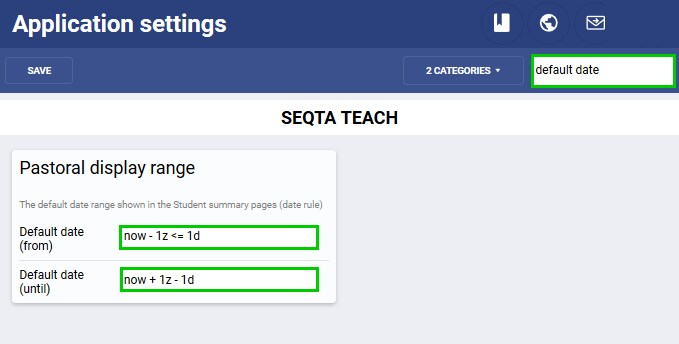
- Go to the Administration workspace > Application settings
- Type 'default date' (without the quotes) in the search box in the top-right corner
- Under the sub-heading 'Pastoral display range' set the Default date (from) and Default date (to), be sure to enter these in the correct format (see below).
- Default date (from): Display pastoral care notes from two months ago '- 2z' until the current day. Rule: now - 2z <= 1d
- Default date (to): The day after the current day till one month in the future. Rule: now - 1z - 1d
- Click SAVE
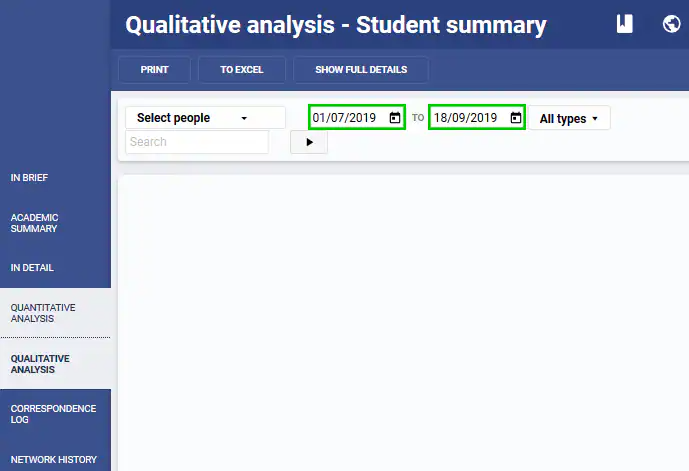
Where does the date range show in the Student summary pages?
The date range displays in the Student summary pages under 'Quantitative Analysis' and 'Qualitative Analysis' pages.
Was this article helpful?
That’s Great!
Thank you for your feedback
Sorry! We couldn't be helpful
Thank you for your feedback
Feedback sent
We appreciate your effort and will try to fix the article