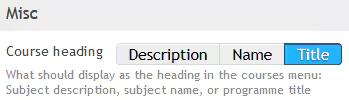
The course heading, displayed under the menu item 'Courses' in SEQTA Learn and SEQTA Engage, can be drawn from three places. These are:
- Description: the field called 'description' in the subject record
- Name: the field called 'name' in the subject record
- Title: the title of the Programme linked to the class (default)
Changing where the course heading is drawn from in SEQTA Engage and SEQTA Learn
To change where the course heading is drawn from:
- Go to the Administration workspace > Application settings > Application settings
- Type the word 'heading' (without the quotes) into the box in the top-right corner
- Select which of the three options to use (ie. Description, Name or Title)
- Click SAVE
Was this article helpful?
That’s Great!
Thank you for your feedback
Sorry! We couldn't be helpful
Thank you for your feedback
Feedback sent
We appreciate your effort and will try to fix the article